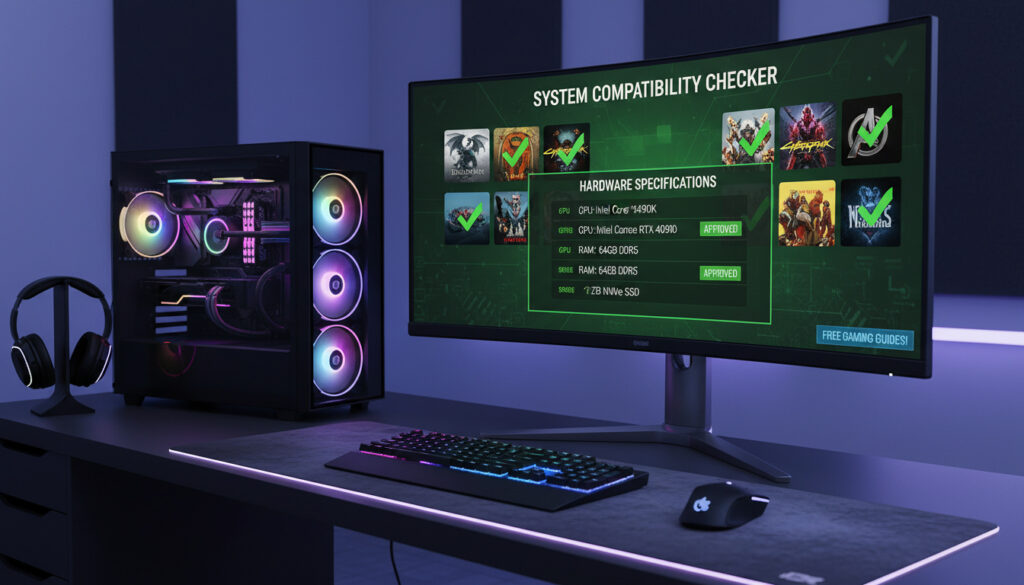
Can My PC Run It – Free Game Compatibility Guide
PC hardware evolves rapidly. A configuration that dominates current titles may struggle with next quarter’s releases. Before committing to purchases like Cyberpunk 2077 or Grand Theft Auto V, gamers require concrete data. System Requirements Lab, operating publicly as Can You RUN It, provides automated compatibility analysis.
Since 2005, the service has processed hundreds of millions of diagnostics. It compares local hardware against requirements for over 13,000 titles. Unlike static specification charts, the tool actively scans CPUs, GPUs, RAM, and storage configurations.
This analysis examines the tool’s operational mechanics, safety protocols, accuracy boundaries, and viable alternatives.
What is Can I Run It and How Does It Work?
Hardware detection and compatibility analysis
System Requirements Lab
Free (no premium tiers)
13,000+ games (16,000+ with CYRI Score)
- Automated detection covers CPU, GPU, RAM, storage, and operating system specifications
- Compatible with Windows 7 through Windows 11 and major browsers including Chrome, Edge, Firefox, and Opera
- Results display via color-coded indicators (green checkmarks for passing components)
- Explicitly collects zero personally identifiable information during scans
- Operational track record spanning from 2005 to present
- Generates specific upgrade recommendations when hardware falls short
- CYRI Score benchmarks capability across 16,000+ popular titles
| Attribute | Specification |
|---|---|
| Developer | System Requirements Lab |
| Launch Year | 2005 |
| Supported Platform | Windows only (7/8/10/11) |
| Detection Method | One-click downloadable application |
| Database Size | 13,000+ PC games |
| CYRI Score Coverage | 16,000+ titles |
| Cost Structure | Free with no subscription tiers |
| Data Collection | Hardware/software specs only; no PII |
| Browser Support | Chrome, Edge, Firefox, Opera |
| Output Format | Color-coded pass/fail indicators |
| Additional Features | Upgrade path recommendations |
| Laptop Compatibility | Full support for Windows laptops |
Is Can You RUN It Safe and Accurate?
Privacy Safeguards
The application explicitly states that no personally identifiable information is harvested during analysis. Scans evaluate only hardware components and system software configurations. Official documentation confirms this data policy.
The downloadable client requires temporary firewall allowances during execution. It operates as a lightweight, single-use executable that terminates immediately after transmitting scan results. No permanent installation remains on the system.
Detection Accuracy
The tool provides rapid hardware detection against extensive databases. However, video documentation reveals occasional misreadings, particularly with multi-core processors. Specific instances include the tool underestimating AMD Phenom six-core 3GHz processors as insufficient for requirements listing two-core 2.4GHz CPUs.
General user consensus indicates reliability for standard compatibility checks. Edge cases involving unusual hardware configurations or integrated graphics solutions may require manual verification against publisher specifications.
Detection algorithms may misinterpret multi-core CPU performance, occasionally flagging capable processors as insufficient. Users encountering borderline results should cross-reference with CYRI Score data or manual manufacturer specifications.
How to Download and Use the Can You RUN It Tool
Installation Process
Access begins at systemrequirementslab.com/cyri. Users search for specific titles—such as Cyberpunk 2077 or GTA V—or browse curated game lists encompassing popular series.
Clicking the “Can You RUN It?” button initiates download of the detection client. Users must execute the application, potentially bypassing SmartScreen or firewall prompts, and grant brief internet access for data transmission. The utility analyzes components and automatically closes, displaying results within the browser.
Platform Support
The tool supports both desktop and laptop configurations running Windows. Non-Windows operating systems register as “Other” with limited functionality. The complete games list remains accessible for manual review regardless of operating system.
For gamers considering hardware modifications, understanding BIOS updates can improve compatibility. Refer to How to Update BIOS – Safe Steps for ASUS MSI Gigabyte for guidance on motherboard firmware updates that may resolve hardware detection issues.
The detection application requires temporary internet access to transmit hardware data. Windows Defender SmartScreen may flag the executable; users must manually approve the file to complete scanning.
Best Alternatives to Can You RUN It
While System Requirements Lab dominates the field, secondary options provide different methodologies. Technical.city offers an alternative focusing on FPS predictions across 8,386 games, with actual benchmark data available for 3,647 titles.
This alternative operates without mandatory downloads, utilizing manual input or optional auto-detection. It emphasizes frame-rate estimations rather than binary pass/fail determinations.
| Tool | Key Features | Games Supported | Method |
|---|---|---|---|
| System Requirements Lab | Hardware scan, upgrade suggestions, CYRI Score | 13,000+ | Downloadable scan |
| Technical.city | FPS calculator, min/recommended checker | 8,386 (3,647 with FPS data) | Manual input or auto-detection |
For users seeking mobile hardware deals rather than PC diagnostics, retail clearances offer alternative upgrade paths. Check current Tesco Mobile Phones Clearance – Best Deals and Buying Guide for budget device options.
How Has the Service Evolved Over Time?
- 2005: System Requirements Lab launches Can You RUN It service, establishing early automated compatibility checking. Source: Official documentation
- 2005–2020: Database expands to cover 13,000+ PC games through continuous publisher partnership updates. Source: Games database
- Present: Service processes hundreds of millions of scans with CYRI Score benchmarking 16,000+ titles against real-world tested hardware data. Source: Usage statistics
Established Facts vs. Remaining Uncertainties
Confirmed Information
- Tool scans CPU, GPU, RAM, storage, and OS components automatically
- Zero personally identifiable information is collected during analysis
- Windows 7, 8, 10, and 11 are fully supported operating environments
- Database contains minimum and recommended specifications for 13,000+ games
- Application requires no permanent installation and closes post-scan
- Laptop hardware (including integrated GPUs) evaluates identically to desktop components
Unverified or Unclear Areas
- Specific algorithm weighting for multi-core vs. single-core CPU performance
- Exact frequency of database updates when publishers release patches
- Development roadmap for macOS or Linux native support
- Precision thresholds for borderline hardware configurations (within 5-10% of requirements)
Why Automated Compatibility Checking Matters
Digital distribution platforms like Steam offer refund policies, but requesting returns wastes time and bandwidth. Automated spec checking prevents purchase errors before transaction completion. This is particularly critical given the rising system requirements of modern AI-enhanced titles and ray-tracing implementations.
The tool bridges knowledge gaps for users unfamiliar with technical specifications. Rather than decoding TDP ratings or PCIe generation compatibility, gamers receive direct answers about specific titles.
What Sources Confirm About Reliability
“No personal data is collected—only hardware and system software details are evaluated.”
— System Requirements Lab Official Policy
“Users report it as generally reliable for basic checks but recommend manual verification for edge cases.”
— Technical Analysis Documentation
Final Assessment
Can You RUN It provides a legitimate, free service for Windows users evaluating game compatibility. The tool’s two-decade operational history and hundreds of millions of scans demonstrate reliability for standard hardware configurations. While occasional CPU detection errors occur, particularly with older multi-core processors, the service remains a valuable first-line check. For definitive answers regarding borderline systems, manual specification comparison against publisher requirements remains advisable. Those seeking hardware upgrades should explore component compatibility resources alongside software diagnostics.
Frequently Asked Questions
Is Can You RUN It completely free?
Yes. The service operates without premium tiers or subscription fees. Instant reports include upgrade suggestions at no cost.
Does it work on macOS or Linux?
No. The detection application supports Windows 7 through 11 only. Non-Windows systems display as “Other” with limited functionality.
Can I check laptop compatibility?
Yes. Fully supports Windows laptops, evaluating mobile GPUs and processors against desktop equivalents using the same scanning methodology.
How accurate are the results?
Generally reliable for standard checks, though occasional misreads occur with multi-core CPUs. Manual verification recommended for borderline cases.
What is the CYRI Score?
A benchmarking metric ranking your PC against 16,000+ games based on real-world tested hardware data.
Are there alternatives without downloading software?
Technical.city offers browser-based checking with manual input options, covering 8,386 games including FPS predictions.
Does it integrate directly with Steam?
No native Steam integration exists, though the database covers most Steam titles including GTA V, Red Dead Redemption 2, and Forza Motorsport.
Is the downloaded application safe?
Yes. The executable is lightweight, exits after analysis, and collects no personal data. Temporary firewall approval is required during scanning.
More related posts
 Foot and Mouth Disease: Symptoms, Treatment, Prevention
 Any Football On Tonight – NFL, College & Soccer TV Schedule
 24/7 Fitness in Ireland: Membership Costs, Rules & Chains
 David James: Footballer and Irish Singer – Who Is Who
 Go Compare Travel Insurance: Compare Quotes for Best Cover
 Thick of It Lyric : Full Song Text, Meaning, Ver ion & More
 Best 2 Litre Water Bottle UK 2026: Sizes, Materials & Reviews
 English to Tamil Translation Guide: Tools, Apps & Tips